The story of our new ENV vars edit experience
Published
🔖
ENV var like a pro.
Editing ENV vars should be easy, right? Here's how we iterated to make it more powerful and developer-friendly, tackling devilish details.
New fancy base64 helper
If you prefix an environment variable value with fr+base64: we validate that the following string is base64 encoded, and then automatically decode the variable in the live environment for you.
This is what it looks like:
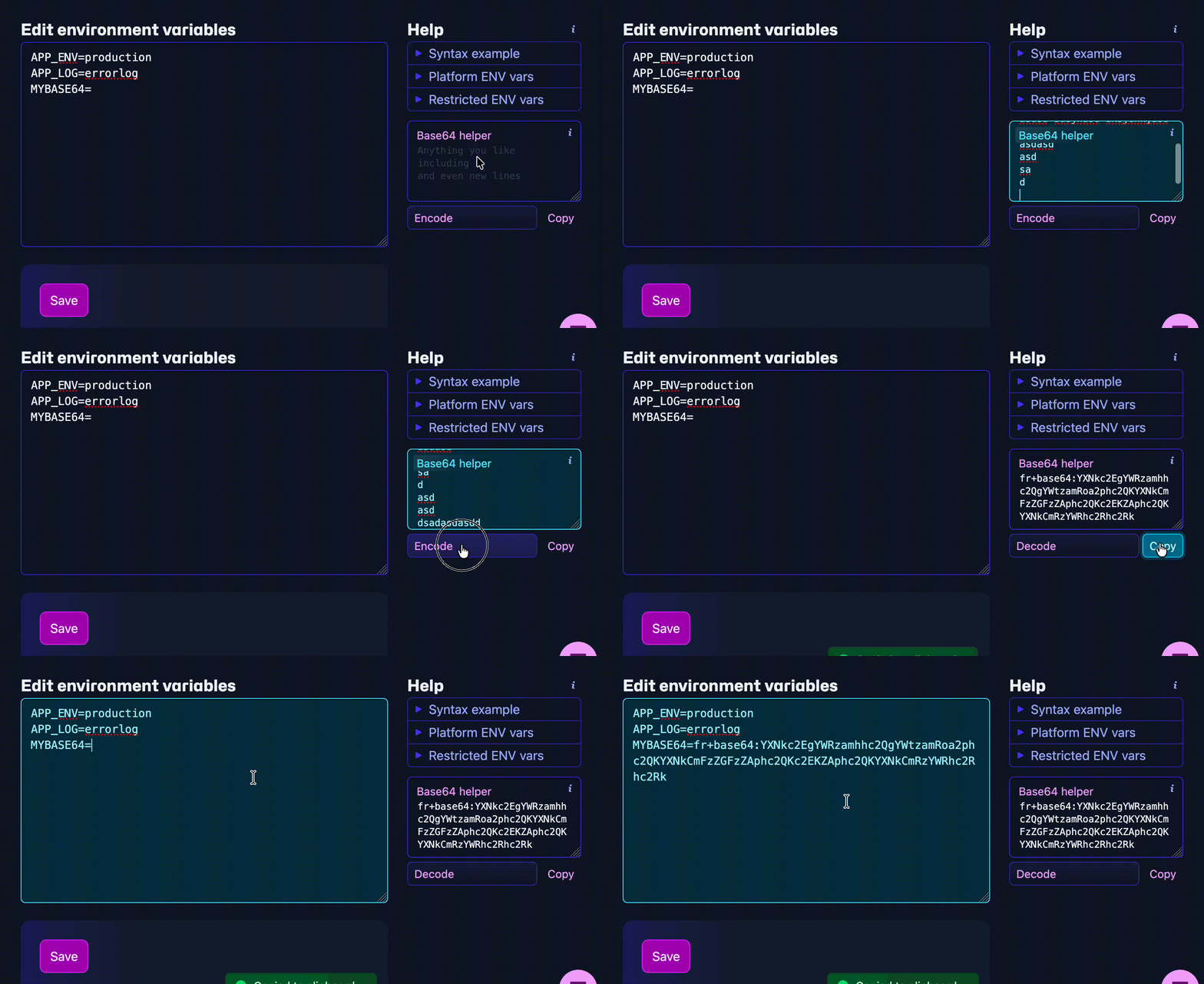
And here's how we got there:
It starts with a support request
A customer reported that an ENV var with a password mysteriously showed an incorrect value in PHP. Somehow, a string similar to O3~YR$FK@8R.0X turned into something else.
The value O3~YR$FK@8R.0X was shortened because $FK was interpolated to an empty string. Similarly, if the string were O3~YR$FORTRABBIT_DB_NAME@8R.0X, it would replace $FORTRABBIT_DB_NAME with the database name. This interpolation is needed when customers set CRAFT_DB_USER: '${FORTRABBIT_DB_USER}'. It's also sometimes used by default in Laravel, for example: VITE_APP_NAME: ${APP_NAME}.
So, we want interpolation sometimes, but not always.
Old platform
Dollar signs were not allowed at all. But interpolation still worked! How?
When a customer entered NAME=${VALUE}, it was transformed internally into NAME=%%%VALUE%%% and then put back before being handed to the app. To handle passwords with dollar signs, we instructed customers to base64 encode them themselves.
New platform
Dollar signs, double quotes, and many other characters that were forbidden on the old platform were allowed on the new platform. However, backslashes and single quotes were still not permitted.
The platform safely interpret and export all defined ENV vars to the live environment, including those that have interpolation like CRAFT_DB_USER: '${FORTRABBIT_DB_USER}'.
But, we don't always want interpolation.
Possible solutions
We discussed next steps with the team, since it required contributions from everyone.
1 - Escape dollar signs
In the dotenv world, the solution is to escape all dollar signs with \$. For example, customers would enter 123\$FK@45 to get 123$FK@45.
However, the backslash character is forbidden because it would allow customers to enter the few characters we have forbidden and possibly circumvent our safe parsing.
2 - Use single quotes
In Bash, surrounding a value with double quotes ("123$FK@45") interpolates it, resulting in 123@45. However, single quotes ('123$FK@45') prevent interpolation, resulting in 123$FK@45. Unfortunately, this difference is not supported in .env files (e.g. in vlucas/phpdotenv), so customers copying content from them won't be aware of this Bash feature.
Additionally, our backend strips all quotes from variables and values are rewrapped in quotes when used. So we cannot easily make the platform see a difference in quotes.
3 - Base64 encoding tool
We tell customers to prefix problematic ENV var values with base64:, the infrastructure then automatically decodes the base64 encoded value after interpolation has happened. The dashboard can also offer a small widget to easily encode/decode values to base64. Additionally, we should disallow lone dollar signs to give customers an early error, ensuring they base64 encode passwords that include dollar signs.
- Disallow single
$ - Allow
${when properly closed with}for interpolation
Gotcha
Testing the base64 encoder with a wonderful customer revealed an oversight. Laravel already has a base64: helper for ENV vars, which interferes with our implementation.
This is because our implementation cannot allow NULL characters, but the Laravel implementation does. Laravel's automatic APP_KEY generator also often generates keys with NULL characters, so they are commonly used.
This meant that we could not mix our base64 decoder with laravels implementation.
Finally solved
Our helper prefix is now fr+base64: to differentiate it from Laravel. When used in an ENV var in our dashboard, we automatically decode the variable after the interpolation is done. The live environment then sees the decoded value right away.
Works like a charm ✨✨